What Is VRChat ERP? 🤔
ERP stands for Erotic Roleplay, and in the context of VRChat it refers to immersive, adult-oriented roleplaying between consenting users inside the game. VRChat provides a unique sandbox where players can embody custom avatars, use voice and gesture systems, and explore thousands of worlds — making it one of the most popular platforms for ERP in the metaverse.
Unlike traditional text-based ERP, VRChat adds a full 3D social layer: you can see, hear, and interact with others in real time using motion-tracked avatars. This creates an unprecedented level of immersion — and also brings unique challenges around consent, safety, and community guidelines.
ERP in VRChat is not officially endorsed by the developers (VRChat Inc.), but it has grown into a massive subculture within the player base. Dedicated worlds, Discords, and avatar marketplaces have sprung up to support the community. If you're curious about exploring this side of VRChat, you've come to the right place.
💡 Insider Perspective: “ERP in VRChat is as diverse as the people who do it. Some treat it as a serious storytelling medium; others keep it casual. The common thread is mutual respect and clear communication.” — Veteran VRChat roleplayer, 4+ years
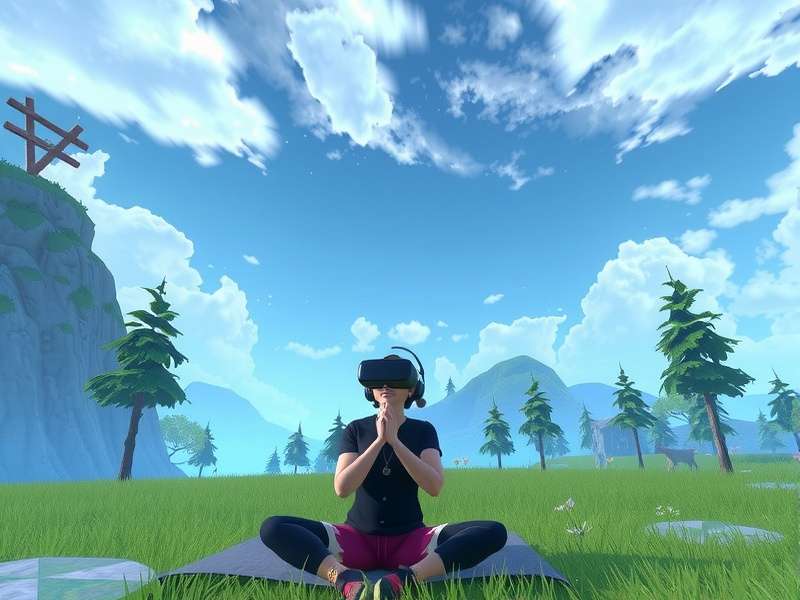
Figure 1: A typical ERP-friendly VRChat world with custom avatars and atmospheric lighting.
The ERP scene has evolved significantly since VRChat's early days. What started as improvised roleplay in public lobbies has become a structured subculture with its own norms, tools, and economy. Today, you'll find dedicated ERP worlds with password gating, avatar creators specializing in adult-oriented models, and even in-game economies based on props and animations.
For many, ERP is a way to explore identity, connect with others on a deeper level, or simply have fun in a fantasy setting. The key is to approach it with maturity, empathy, and respect for boundaries — which is exactly what this guide will help you do.
Getting Started with VRChat ERP 🚀
New to ERP in VRChat? Don't worry — every expert was once a beginner. Here's how to set yourself up for a positive experience.
2.1 Set Up Your Avatar
Your avatar is your identity in VRChat. For ERP, you'll want a model that supports Avatar Dynamics (bones, contacts, and gestures). Many players start with free avatars from worlds like Avatar World or Prill's Pug, then graduate to custom commissions. If you're looking for premium options, check out Gumroad VRChat Avatar — one of the most popular marketplaces for high-quality ERP-ready models.
2.2 Find ERP Communities
ERP doesn't happen in isolation. The best way to get started is to join a community. Many ERP groups use Discord for organizing events and vetting members. Search for terms like "VRChat ERP Discord" or "VRChat adult roleplay" — but be prepared to verify your age. You can also check out VRChat Avatars Worlds for world recommendations that are ERP-friendly.
2.3 Essential Tools & Mods
While VRChat's base game supports ERP, some players use third-party mods (like KISS Multi-gesture or Dynamic Bones extensions) to enhance the experience. Important: Mods violate VRChat's ToS, so use them at your own risk. The safest route is to rely on in-game Avatar Dynamics and OSC (Open Sound Control) for custom animations.
For tracking, VRChat Mobile Tracking is a solid option if you want to add full-body movement without a dedicated tracker setup.
Best Avatars for ERP in VRChat 🎭
Your avatar can make or break your ERP experience. Here's what to look for:
3.1 Custom Avatars from Gumroad
Gumroad VRChat Avatar is the go-to marketplace for ERP-ready avatars. Creators like Rin Avatars, Juniper's Models, and Kuma3D offer models with full dynamic bones, expressive blendshapes, and optimized polygon counts. Prices range from $15 to $60 for high-quality models.
3.2 Avatar Optimization Tips
ERP worlds can be performance-heavy. To keep your frame rate smooth:
- Keep polygon count under 70k for Quest compatibility.
- Use 4K textures max — 2K is often sufficient.
- Limit dynamic bone colliders to 10–15 per avatar.
- Enable Impostors for faraway avatars.
3.3 Where to Find Free Avatars
Not ready to spend money? Check out VRChat Avatars Search to discover thousands of free models. Many public avatar worlds have hidden gems — you just need to know where to look.
ERP Communities & Worlds 🌍
The ERP scene in VRChat is decentralized, but several hubs stand out:
4.1 Popular ERP Worlds
- The Black Cat — A social hub that often hosts ERP-friendly groups in private instances.
- Club Orion — A virtual nightclub with ERP-friendly back rooms.
- Zen Garden — A calm, aesthetic world popular for intimate roleplay.
- Midnight Rooftop — Atmospheric and private, great for one-on-one scenes.
4.2 Building Your Network
Most ERP happens in private instances or through Discord-organized events. To build connections, hang out in public worlds, be respectful, and use the VRChat Home world as a starting point. The VRC Home page has more tips for new players.
4.3 Discord Communities
Discord is the backbone of VRChat ERP. Servers like The ERP Collective, VRChat Adult Hub, and Roleplay Sanctuary offer vetting systems, event calendars, and avatar trading channels. Always read the rules carefully — most require age verification.
VRChat ERP Etiquette & Consent ✅
ERP is a shared experience. The golden rule: always get explicit, enthusiastic consent before engaging.
5.1 Consent Is Key
Never assume someone is interested. Start by asking clearly: "Would you like to ERP?" or "Are you open to adult roleplay?" Respect a "no" or "not now" without pressure. In VRChat, you can also use the in-game status indicators to signal availability.
5.2 Public vs Private Instances
ERP in public worlds is generally frowned upon and can get you reported. Always move to a private instance or invite-only world. Many ERP worlds have password protection for exactly this reason.
5.3 Community Guidelines
VRChat's Terms of Service prohibit "sexually explicit content" in public spaces. While ERP itself isn't banned, doing it in public instances violates the rules. Use common sense: keep it private, keep it consensual, and keep it safe.
🔐 Pro Tip: Set up a safe word before any ERP session. If things get uncomfortable, either party can say the safe word to pause or stop immediately. This builds trust and makes the experience better for everyone.
VRChat Age Verification 🔞
Age verification is a hot topic in the VRChat ERP community. VRChat Age Verification Release Date has been anticipated for months, and the community is eager for an official system. As of mid-2025, VRChat Inc. has been testing a third-party age verification integration that would allow users to prove they're 18+ without sharing personal ID with every group.
6.1 Why Age Verification Matters
ERP communities need age verification to comply with US laws (18 U.S.C. § 2257) and platform rules. Without it, communities risk hosting minors in adult spaces — which is both unethical and illegal. Verified-only servers are becoming the norm.
6.2 Current Solutions
Until the official release, many Discord servers use manual ID checks or services like Yoti and AgeChecked. Always be cautious about sharing your ID — cover sensitive info and use one-time verification links when possible.
For updates, keep an eye on VRChat Server Status and official announcements. The age verification rollout is expected to integrate with VRChat's account system, making it easier to join age-gated communities.
Technical & Optimization ⚙️
ERP can be demanding on your hardware. Here's how to keep things running smoothly:
7.1 Avatar Dynamics & Gestures
Avatar Dynamics are crucial for ERP. They allow physical interactions like touching, holding, and proximity-based responses. To use them:
- Enable Avatar Dynamics in your settings.
- Use avatars with Contact Receivers and Bone Chains.
- Test your gestures in the Avatar Menu before jumping in.
7.2 Optimizing Performance
Low FPS kills the mood. To optimize:
- Set Graphics Quality to Medium or High (not Ultra).
- Enable Safety Settings to block avatars with poor performance.
- Use Quest-compatible avatars if you're on standalone.
- Clear your avatar cache regularly.
7.3 Troubleshooting Common Issues
"My avatar's bones aren't working!" — Make sure your avatar has Dynamic Bones or PhysBones configured. If you're using a modded client, check for conflicts. For persistent issues, visit VRChat Creator Companion Download to get the official toolkit for debugging avatars.
"Can't hear others in ERP worlds" — Check your voice settings and make sure you're not in a Global Mute state. Some worlds have localized audio zones; move closer to other players.
Safety & Privacy in VRChat ERP 🛡️
Your safety is paramount. Here's how to protect yourself while enjoying ERP:
8.1 Protecting Your Identity
- Use a VRChat-specific username that doesn't link to your real name.
- Never share your Discord tag, social media, or phone number with strangers.
- Be careful with screen captures — they can be shared without your consent.
- Use a VPN if you're concerned about IP leaks (especially with modded clients).
8.2 Reporting Harassment
If someone crosses a boundary, use VRChat's block and report features immediately. Gather evidence (screenshots, logs) and submit a report via the official website. For serious cases, consider contacting your local authorities.
8.3 Safe Words & Boundaries
We mentioned this earlier, but it's worth repeating: safe words are non-negotiable. Use simple, memorable words like "Red" (stop) or "Yellow" (pause). Discuss hard limits and triggers before any session. A good ERP partner will respect these without question.
Advanced ERP Techniques 🧠
Ready to level up? Here are some pro tips:
9.1 Using OSC & Trackers
OSC (Open Sound Control) lets you use external tools like VSeeFace or Warudo to control your avatar's expressions and animations in real time. With full-body tracking (via Vive Trackers or SlimeVR), you can use your actual body movements to drive your avatar — making ERP incredibly immersive.
9.2 Custom Animations
Using VRChat Creator Companion, you can create custom animation controllers for your avatar. This allows for tailored gestures, poses, and interactions that standard avatars don't have. It's a bit technical, but the payoff in expressiveness is huge.
9.3 Voice Roleplay Tips
Your voice is a powerful tool. Practice vocal variety — pace, pitch, and tone can convey more than words alone. Many ERP players use voice changers (like Voicemod) to match their avatar's character. Just be transparent with your partner about it.
Frequently Asked Questions ❓
Is ERP in VRChat against the rules?
ERP itself isn't banned, but doing it in public instances violates VRChat's Content Guidelines. Keep it in private worlds and you're fine.
Do I need a PC for ERP?
You can ERP on Quest standalone, but you'll have fewer avatar options and limited dynamic bones. For the full experience, a PC with VRChat Mobile Tracking or full-body trackers is ideal.
How do I find ERP partners?
Join Discord communities, visit ERP-friendly worlds, and use platforms like ChatGPT to practice roleplay scenarios. Always verify age before engaging.
What's the best avatar for beginners?
Start with a free dynamic-bones avatar from VRChat Avatars Worlds. Once you're comfortable, invest in a custom model from Gumroad VRChat Avatar.
How do I change my home world?
Learn how with our guide on How To Change Your Home World In VRChat. It's a simple setting in your menu.
Is age verification mandatory?
Not yet, but most reputable ERP communities require it. Watch for the official VRChat Age Verification Release Date for a streamlined solution.
What is trolling in VRChat?
Some players engage in VRChat Trolling — disruptive behavior that can ruin ERP experiences. Use safety settings to block trolls and report them.
Final Thoughts 🎯
VRChat ERP is a rich, complex subculture that offers incredible opportunities for creative expression, connection, and exploration. Whether you're a curious newcomer or a seasoned roleplayer, the keys to a great experience are consent, communication, and common sense.
Remember: the VRChat community is vast, and you're never alone. Use the resources on playvrchatgame.com to stay informed, find communities, and level up your skills. Bookmark our VRChat Home and VRC Home pages for quick access to the best guides and tools.
Thank you for reading — and happy roleplaying! 🚀
Last updated: | Edited by the VRChat Game editorial team