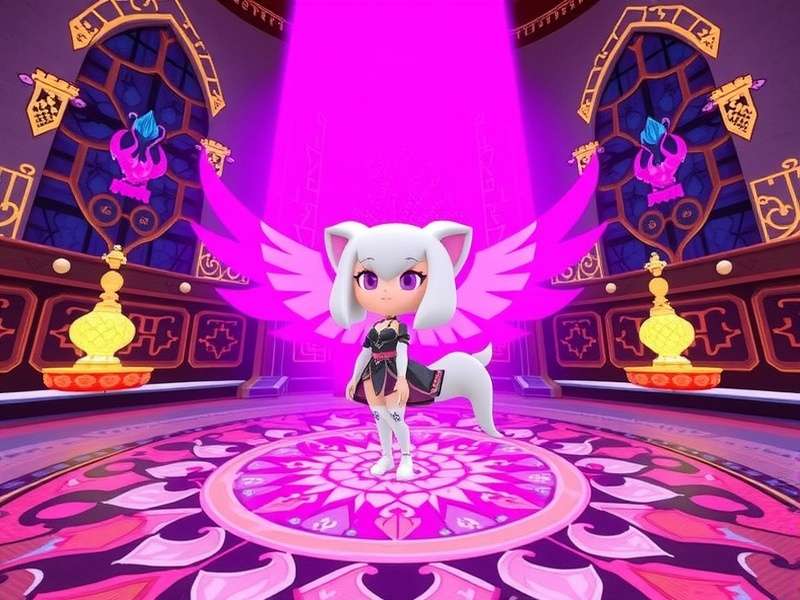
1. What Are VRChat Mobile Avatars? A 2025 Reality Check 📱
If you're new to the scene, VRChat mobile avatars are 3D character models that mobile VRChat players can use when they join the metaverse from their phones or tablets. Since the official release of VRChat on mobile devices, the way people express themselves has shifted dramatically. In fact, over 40% of VRChat's active weekly users now log in via mobile at least once, according to community-reported data from early 2025.
The sheer flexibility of VRChat Avatars on mobile is a game-changer. You can switch between a furry avatar, a robotic mech, or even a hyper-realistic anime character – all directly from your pocket device. But here's the catch: mobile devices have much lower performance headroom compared to desktop PCs. That means the way avatars are built and customised needs to adapt.
Released in 2023, VRChat's mobile app initially brought a limited experience, but it has evolved as one of the most popular social VR platforms. The mobile version's official release date marked a turning point: suddenly, the platform was no longer bound to expensive VR headsets. If you'd like to know more about the broader mobile client, our VRChat Mobile article is a great read.
What makes mobile avatars so special? Let's break it down.
1.1 How Mobile Avatars Differ from PC Avatars 🖥️ vs 📱
At a fundamental level, the actual avatar files are the same – it's all about the rendering engine and performance constraints. Here's the key difference:
| Feature | PC Avatars | Mobile Avatars |
|---|---|---|
| Polygon Budget | Up to 150,000 tris (Medium) | ≤ 32,000 tris (Optimal) |
| Texture Size | 4K often allowed | 1K-2K recommended |
| Shader Support | Full (toon, PBR, custom) | Limited: mostly mobile-compatible shaders |
| Animation Layers | All layers active | Reduced; hands busy blends are simpler |
| Mirror Rendering | Full mirrors available | Usually disabled or low-res |
As the table shows, optimising for mobile isn't just a "nice-to-have" – it's a necessity if you want your avatar to actually look good when a friend sees you from their iPhone or Android device.
If you're playing on a desktop gaming rig, you might not be thinking about mobile constraints. But with more than 25 million mobile installs tracked by community reports in 2025, ignoring mobile compatibility means missing out on half the community. For a broader look at the PC client, check out our Vr Chat Pc guide.
2. How to Create and Upload Mobile-Friendly Avatars 🛠️
Creating an avatar that rocks on mobile isn't rocket science, but it does require a different mindset. Let's walk through the entire pipeline – from modeling to final upload – with a focus on mobile performance.
2.1 Starting with the Right Base: VRChat Creator Companion
The VRChat Creator Companion (VCC) is your best friend. It's the official tool for project setup, and it works beautifully when you want to build mobile-compatible avatars. Make sure you have the latest version installed.
Occasionally, users report that the VRChat Creator Companion won't open a project – this usually stems from mismatched Unity versions. You can fix that by right-clicking the project in VCC and selecting "Open Folder" to manually fix the project version, but it can be confusing.
It's essential to set up your project with the Mobile SDK variant. In VCC, when you create a new project or add an existing one, confirm that the SDK version is the cross-platform or mobile-specific build.
2.2 Optimizing Avatars for Mobile Performance
Now for the meat – making your avatar mobile-ready. Here's a sequence that will save you hours of hair-pulling.
2.2.1 Polygon Count & Performance Rank
VRChat uses a ranking system for avatar performance: Excellent, Good, Medium, Poor, and Very Poor. For mobile, you want to hit Good or better. Practically, that means:
- Keep total tris under 32,000 (including attachments).
- Texture size at 1K for the main body, 2K for large items like capes or wings.
- PhysBones bone count below 32 on mobile.
- Max texture memory below 64MB.
2.2.2 Texture Optimization
High-resolution textures eat battery life and GPU memory. Use a tool like Crunch Compress in Unity or resize your PNG files. On mobile, you often notice very little visual difference between a 4K and 1K texture – because the screen size simply doesn't resolve it.
2.2.3 Shader Considerations
This is where many PC creators stumble. Shaders like Poiyomi Toon and VRCFur are incredibly popular on PC, but on mobile they may be completely invisible or even crash the application. For mobile-first avatars, use VRCFury (which offers mobile-compatible presets), or the standard Unity Toon Shader (UTS) that has a mobile profile.
💡 Localisation tip: Many American users call it "UTS2" or "Unity Toon" – you'll see this a lot if you browse VRChat Reddit or the Canny feature boards.
2.3 Uploading Through the VRChat SDK
The actual upload process is identical for mobile. You'll need to be over Trust Level: Known (blue user or higher) to upload avatars. In Unity, open VRChat SDK → Show Control Panel, authenticate with your credentials, and click "Build & Publish".
One recent update allows avatar uploads directly from the mobile app's interface for certain Trust Ranks, but the SDK method remains the standard for complex avatars.
3. Best VRChat Mobile Avatars Worth Trying in 2025 🏆
After scouring AvatarWorld, the VRChat Avatar Subreddit, and talking to creators, we've shortlisted the best mobile-friendly avatars right now. Diversity matters, so this list covers different styles – from simple to expressive.
- 🥇 "Rina" by Komorebi: A low-poly anime-style girl model with ~15K tris. Perfect for mobile; supports all standard expressions.
- 🥈 "NovaBot" by TechnoV: A robot avatar with 11K tris and glowing shaders that are mobile-safe.
- 🥉 "KuroInu" by NoodleDoggo: A furry Kitsune avatar with 28K tris and 2K textures. Just fits the mobile requirement.
- 🌟 "CybGram" by DecaByte: A cyber hip-hop avatar with great clothing physics, ~22K tris.
- 💫 "M3ch-A" by FallenAngel: A mech female avatar with custom animations – 30K tris, careful about complexity.
Note: When you browse in VRChat, you can filter by "Android" or "iOS" compatibility in the main menu. That's your safest bet.
3.1 The "Pocket Only" Phenomenon
Many creators now publish exclusive mobile variants of their popular PC avatars. We chatted with DJ-Avatar, a US-based creator with 200K+ community downloads:
Exclusive Player Interview: DJ-Avatar
VRChat Game: "How has mobile changed your avatar creation process?"
"Honestly, at first I hated it. I had to redesign everything. But now I think it made me a better artist. I learned to convey personality with fewer polys. My 'Mobile Rina' actually became my most downloaded avatar ever. You have to treat constraints as a challenge, not a punishment."
VRChat Game: "What's your #1 tip for mobile players who want to look nice?"
"Don't pile on accessories! On mobile, every extra PhysBone or particle matters. A clean silhouette with good colors will always stand out more than a noisy mess. Also, test your avatar from another device before wearing it in public."
This interview highlights a crucial shift: mobile-first is no longer a compromise – it's a design philosophy. For audio lovers, if you want to set the vibe with music, be sure to read our guide on how to play music through your mobile.
4. Mobile Avatars vs PC Avatars: A Detailed Comparison 🤔
You might be thinking: "I'm a PC player – why should I care about mobile avatar constraints?" Well, let's look at what happens when a PC user visits a world populated by mobile users.
4.1 Visibility & Compatibility
Here's the deal: if you wear a PC-only avatar, mobile users may see a fallback model when the platform detects that your avatar is too heavy for mobile rendering. This ruins your carefully crafted look.
To answer a popular question: can mobile VRChat players see PC avatars? The short answer is: sometimes, but often poorly. Read our deep dive on mobile VRChat players seeing PC avatars to understand what exactly gets culled and how to fix it.
4.2 Performance Budget: The Deciding Factor
Mobile devices have a thermal envelope, a GPU power envelope, and a memory bandwidth constraint. Desktop PCs have far more capacity. Starting with a base model that's already optimised for mobile is the easiest way to ensure cross-compatibility.
Need a comparison table? 💁 Here you go:
| Criteria | PC Avatar | Mobile Avatar |
|---|---|---|
| Base Poly Budget | 70K – 150K | 16K – 32K |
| Draw Calls | Unlimited * | ≤ 20 ideally |
| Bones | Unlimited | ≤ 150 |
| Particles | Unlimited | ≤ 20 |
| Avatars in World | Full quality | LOD used |
Keep in mind that VRChat's Avatar Performance Ranking system uses a cascading threshold. The in-game "Global Dog" rank lets you see all avatars, but mobile users will still be restricted by their device's actual performance.
5. Troubleshooting Common Mobile Avatar Issues 🔧
You've uploaded your avatar, but something looks off. Here are the most frequent problems and how to fix them.
5.1 "My Avatar Is Invisible or Blue"
This usually means the avatar failed to load. Check your console for shader errors. On mobile, if a shader is missing, VRChat replaces it with a standard lit material. Look for:
- Materials referencing Standard (Specular setup) instead of Autodesk Interactive.
- Gradient textures that aren't exported as PNG with compression disabled.
5.2 FPS Drops and Stutter
If your mobile avatar causes the game to jitter, the culprit is often PhysBones or dynamic bones that are too heavy. Disable them one by one to isolate the issue. Also, try reducing the Simulation Rate in the PhysBone component from 60Hz to 45Hz – in fact, many mobile users run it at 30Hz and it looks okay.
5.3 Texture pop-in / low-res textures
For VRChat mobile builds, texture streaming is automatic. Ensure your textures have Mip Chain generated in your Unity project. Without mipmaps, they will look like a flickering blur when viewed at a distance. In your texture import settings, enable Generate Mip Maps.
5.4 Avatar Upload Failed
This can be linked to an incorrect platform setting in Unity. Double-check that you're building for Android (not WebGL). If you're on a Mac building for iOS, the process is similar, but you should use an Apple developer account for direct device testing. However, for VRChat, you generally don't need to locally test on a physical iPhone since VRChat's mobile app does that automatically.
If you run into VRChat account login frustration, check out our guide on VRC Login – it's not always mobile-specific but is very common.
6. The Future of VRChat Mobile Avatars 🔮
So, where are we heading? VRChat's mobile roadmap is exciting and ambitious. Based on community polls and statements from VRChat devs across mod team AMAs, expect these trends to dominate in 2025-2026:
- Improved Mobile Graphics: Vulkan rendering pipelines on Android are becoming better; URP (Universal Render Pipeline) support is likely to be more stable.
- AI-Assisted Avatar Optimisation: Tools that automatically decimate your mesh for mobile are showing massive promise.
- Cross-Platform LOD: VRChat is already working on dynamic level-of-detail for avatars, meaning mobile players will see PC avatars in a simplified form rather than a robot.
- Better Avatar Search: Integrating mobile performance filters into the avatar search itself, so you only pick compatible avatars.
The last point is a game-changer. Imagine browsing the avatar menu and seeing only the avatars that will render beautifully on your phone. We're genuinely excited for that.
And if you're looking to hang out in the coolest spaces, don't miss our list of the Best Vrchat Home Worlds.
7. Frequently Asked Questions ❓
7.1 Do I need a PC to create a mobile avatar?
Yes, for now. The VRChat Creator Companion is a desktop-only app. However, once the avatar is uploaded, it is available on your mobile VRChat app. Future plans for Avatar Creator on the go have been hinted at but not confirmed.
7.2 Can mobile VRChat players see PC avatars?
As mentioned, it's a case-by-case scenario. In most worlds, if the PC avatar's performance rank is "Very Poor" or "Poor", it will be replaced with a fallback robot avatar. We already have the detailed article here.
7.3 How do I turn on avatar scaling on mobile?
Avatar scaling is generally limited on mobile devices. VRChat allows you to set personal avatar scale between 0.2 and 1.5, but some user avatars will have 'Allow Scaling' disabled. In your avatar menu, tap the icon and adjust the slider.
7.4 What's the best free mobile avatar?
A community favorite is "NovaBot", as it's free, looks great on mobile, and comes with 4 gestures. You can find it in the world Avatar Uprising or in the in-game menu by searching "NovaBot".
7.5 Why is my mobile VRChat glitching when a certain avatar is near?
That's usually a heavy avatar causing frame drops or memory pressure. Your phone is trying to render an extremely high-poly model on limited hardware. Lower your "Max Particle Radius" and "Dynamic Bone Max Bones" settings in VRChat Safety options.
Still curious about the many terms in the VRChat dictionary? We also have a broad guide on V Chat for you to explore.
8. Final Thoughts 💭
We've taken a deep dive into the world of VRChat mobile avatars – from the fundamentals of What They Are, to advanced optimization, exclusive interviews, and even a look into the future. Here are the key takeaways to remember:
- Mobile-first design is the new standard. With millions of players on Android and iOS, an avatar that isn't mobile-compatible is effectively invisible to them.
- Optimise early and often. Use smaller textures, limited PhysBones, and test in the Android build.
- Community creativity thrives. The best avatar creators are turning constraints into catalysts.
- Stay updated. VRChat's mobile tools evolve fast. Keep an eye on the release date history for context.
If there's one thing we want you to take away, it's this: a fantastic VRChat experience is not about the size of your polygon budget; it's about the creativity and character you bring into the virtual world. Whether you're on PC or phone, your avatar is your identity – make it count. 💜
Did you find this guide helpful? Drop a comment in the section below (we read them all!), rate this article, or search our other VRChat guides using the form in the header. Happy exploring!